⚡
Instant Paste
Paste images and GIFs directly into your timeline.
Unlimited copy & paste for Premiere Pro — for the price of a coffee. Copy images and GIFs from the web and bring them straight into your edit.
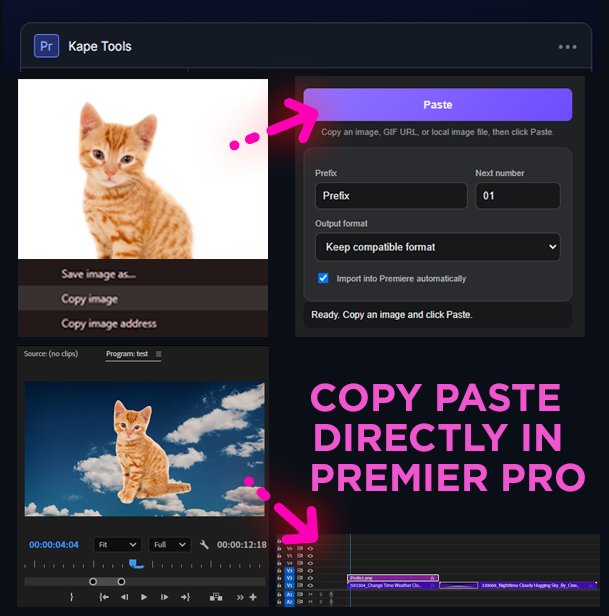
Paste images and GIFs directly into your timeline.
Assets save automatically beside your Premiere project file.
Copy image addresses and preserve animated GIF files.
No more bouncing between apps to download assets.
Do more in less time. Focus on creativity, not busy work.
Fast, simple, and designed to stay out of your way.
Copy an image or GIF from your browser or another source.
Open Kape Tools in Premiere Pro and press Paste.
Your asset is saved and imported into the project automatically.
THE PRICE OF A COFFEE · ONE-TIME PAYMENT
🛒 GET KAPE TOOLS — $5 Buy it once. Use it on every edit. · Perpetual license · Up to 2 devicesPerpetual License
Pay once. Use forever.
2 Devices
Use on up to 2 computers.
Secure Activation
Device-bound license verification.
Get Kape Tools running in Premiere Pro in just a few steps.
Download the Kape Tools ZXP package after purchase and install it with a compatible ZXP Installer.
Launch Premiere Pro and open Kape Tools from the Extensions menu.
Enter the license key provided with your purchase. Internet is required for activation on a new device.
Need help installing or activating? Email support@kapetools.com.
No. Kape Tools is designed as a one-time purchase with a perpetual license.
Internet is required for initial activation on a new device. Once activated, that device keeps its signed perpetual activation.
The standard license includes 2 devices. Special licenses can have a different device limit.
This release is currently focused on Windows. Mac support can be added later.
Yes. The activation is tied to your computer rather than a single Premiere installation.
You can deactivate an old device or contact support to free a device slot for your replacement computer.
Get Kape Tools today and speed up your Premiere Pro workflow.
For purchase, installation, activation, or license assistance, contact Kape Tools support.
Because Kape Tools is downloadable digital software, please review compatibility before purchasing. If the software cannot be activated or used because of a verified technical problem that Kape Tools support cannot resolve, contact us within 14 days of purchase to request a review for a refund.
Refunds are not guaranteed for change of mind, unsupported systems, failure to follow installation instructions, or purchases made after the license has been substantially used. Any refund rights required by applicable law remain unaffected.
Kape Tools collects only information reasonably needed to sell, deliver, support, and activate the software. This may include purchase/contact information supplied through our payment provider and device/license identifiers used for activation and device-limit enforcement.
Payment card details are processed by the checkout provider and are not stored by Kape Tools. We do not sell personal information. For privacy questions, contact support@kapetools.com.
Your purchase grants you a personal, non-exclusive license to use Kape Tools on the number of devices included with your license. The standard license shown on this page includes up to two devices and is perpetual for the purchased version, subject to these terms.
You may not resell, share, redistribute, reverse engineer, bypass activation, or provide your license key to unauthorized users. Compatibility can change as Adobe or operating systems change. Kape Tools is an independent product and is not affiliated with or endorsed by Adobe.